
This post is part of a series.
As I have written before; I like the concept of blog post series. Break a large topic, or ongoing project, into multiple posts — while maintaining the chronological order.
But one key factor for a successful series implementation is the ease at which the read can navigate through the posts. And orient themselves within the series — meaning; understand where in the series they are currently reading.
My latest improvement on my series implementation is navigation buttons, for the previous and next post 👍
The configuration
I’ve already covered how to create and use taxonomies in the previous post, but here is a super short recap.
Add series to the Hugo configuration:
[taxonomies]
  tag = "tags"
  series = "series"
And define it in the post front matter:
series = ["Home network v2", "Network cabling"]
The old
Let’s first have a look at the old implementation — this series overview was shown at the bottom of posts in a series:
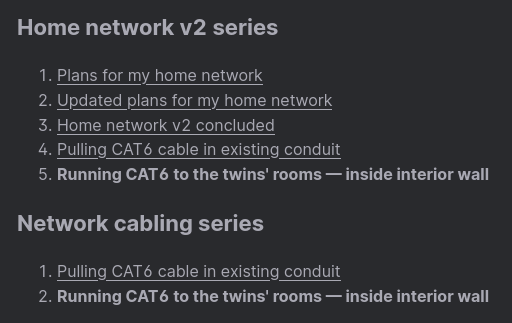
It works, but has two problems:
- If the series has lots of posts; the list becomes very long
- It’s not immediately clear where you are, and how to get to the next post
This can be improved.
The new
With the new implementation; the complete list of posts is normally collapsed. I think this makes sense — because, what the reader typically want, is to get to the next post.
It feels less overwhelming — the information is there, should you need it, but normally hidden:
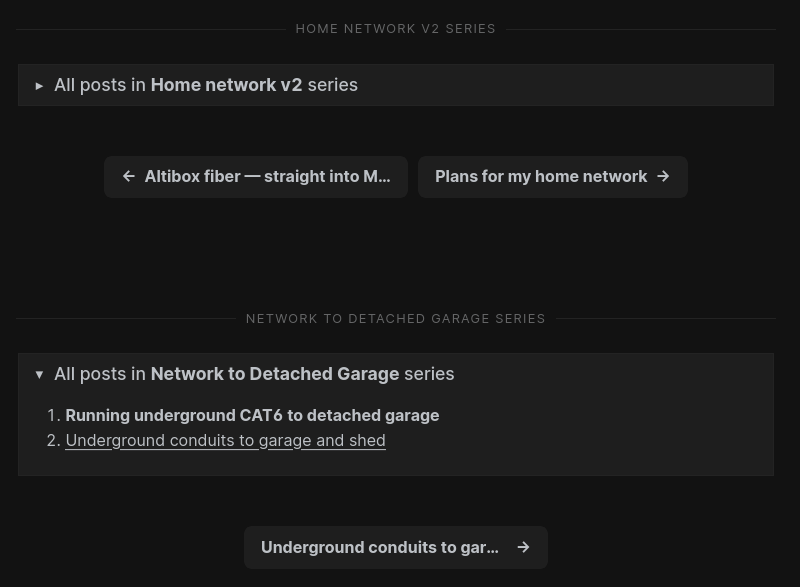
The navigation buttons are of course only visible if there is a previous, or next, post.
*click* Nice! 🍻
The how
When investigating how to navigate a taxonomy in Hugo — I didn’t find many good implementations. In fact; I think my implementation is the cleanest I’ve seen so far.
As before; at the bottom of the single.html layout, there is a partial — series.html:
{{- if .Params.series -}}
  <div class="post-series-bottom">
    {{ partial "series.html" . }}
  </div>
{{- end -}}
And here is that partial. I won’t go into too much detail here — if you know a little Hugo templating, this should be fairly easy to understand:
 1{{- with (.GetTerms "series") -}}
 2  {{- range . -}}
 3    <div class="pagination__title">
 4      <span class="pagination__title-h">
 5          {{ .Title }} series
 6      </span>
 7      <hr />
 8    </div>
 9    {{- $series := .Pages.ByDate -}}
10    <details class="entry-toc">
11      <summary>
12        <span class="entry-toc-header">
13          All posts in <strong>{{ .Title }}</strong> series
14        </span>
15      </summary>
16      <ol>
17        {{- range $series -}}
18        <li>
19          {{- if eq .File.UniqueID $.File.UniqueID -}}
20            <b>{{ .Title }}</b>
21          {{- else -}}
22            <a href="{{ .Permalink }}">{{ .Title }}</a>
23          {{- end -}}
24        </li>
25        {{- end -}}
26      </ol>
27    </details>
28
29    <div class="pagination__buttons" style="margin-top: 50px">
30    {{- with ($series.Reverse.Prev $.Page) -}}
31      <span class="button previous">
32        <a href="{{ .Permalink }}" title="{{ .Title }}">
33          <span class="button__icon">←</span>
34          <span class="button__text">{{ .Title }}</span>
35        </a>
36      </span>
37    {{- end -}}
38    {{- with ($series.Reverse.Next $.Page) -}}
39      <span class="button next">
40        <a href="{{ .Permalink }}" title="{{ .Title }}">
41          <span class="button__text">{{ .Title }}</span>
42          <span class="button__icon">→</span>
43        </a>
44      </span>
45    {{- end -}}
46    </div>
47
48  {{- end -}}
49{{- end -}}
$series must be reversed, as seen on line 30 and 38.
I won’t be covering the styling, that feel outside of the scope for this post, and must be adapted to the theme you are using anyway.
Try it
As this post is part of a series, you can try the new implementation below 👇
A post about series, in a series, that’s meta!
🖖
- Post published2025-01-07
- Simplified series partial, after suggestion by reader Alec. Thanks 👍2026-03-03
All posts in Series taxonomy in Hugo series
- Creating a series taxonomy in Hugo
- Adding support for multiple series per post — in Hugo
- Implementing series navigation buttons — in Hugo
